Home-education planner & evidence log • iPhone + iPad

One app for the whole of home education.

HomeLesson helps a home-educating parent plan the term, run the school day, capture evidence of learning, and produce a local-authority-ready record — for every subject, not just one.

Local-first privacy: records stay private unless you export them. No account, no cloud sync, no analytics. The parent is the teacher — confidence is tracked by parent, never a grade, prediction or assessment.

Coming soon on theApp Store See how it works
On this device — no account One-tap timer + reminders LA-ready PDF portfolio
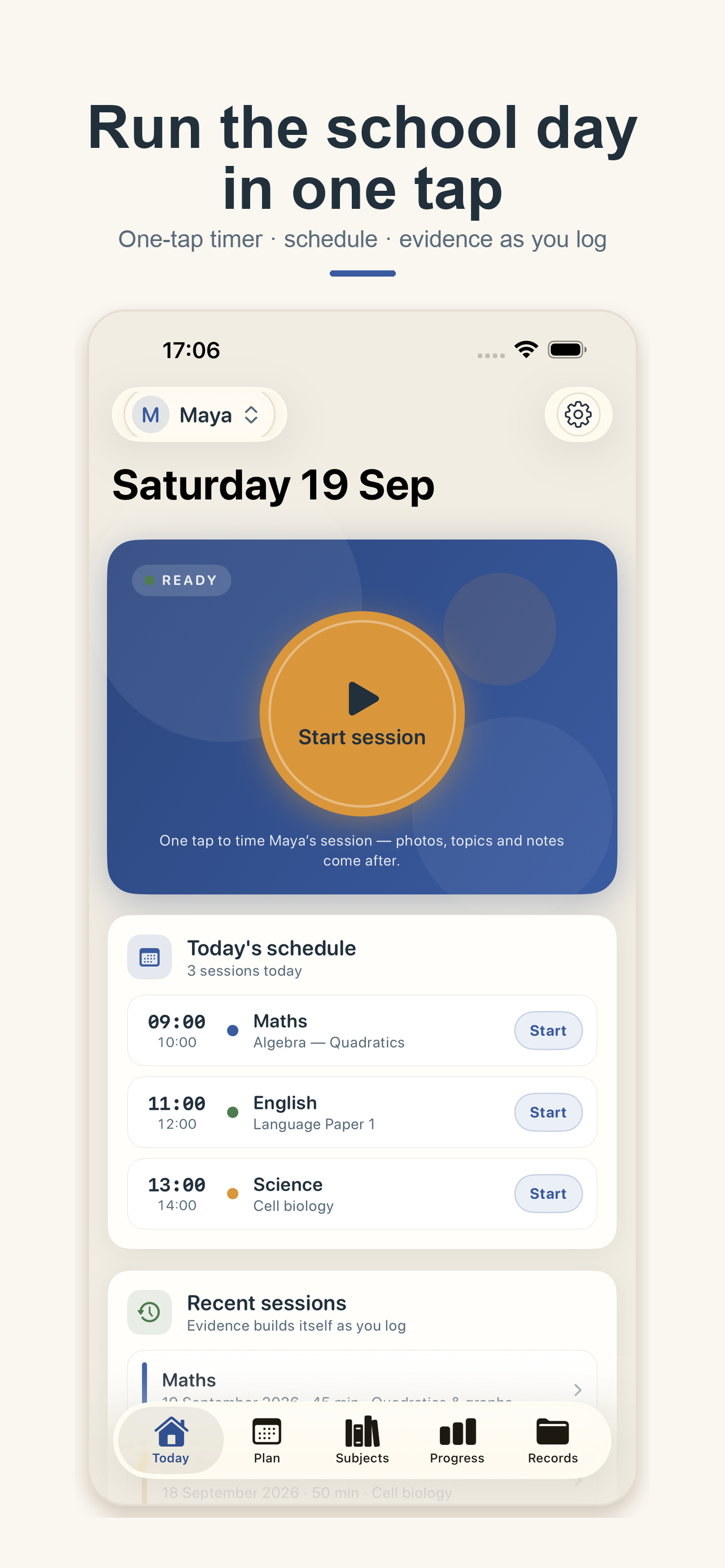
HomeLesson Today screen — Start session timer, today's schedule and recent sessions
⏱ One tap — survives lock & relaunch
🔒 Saved on this deviceNo account • works in Airplane Mode

Why HomeLesson

Calm, reliable, honest.

Five promises, stated up front in the app: one app for all home education; proof without paperwork; know what’s covered; a guided GCSE maths path; reliable and private. The app organises and evidences learning — it never claims to assess your child or replace your judgement.

Run the day in one tap

A large session timer on Today. Start time is persisted before anything changes on screen, so elapsed time survives backgrounding, lock, termination and relaunch. Then attach topics, photos and a note.

No pause • no silent loss

Know what’s covered

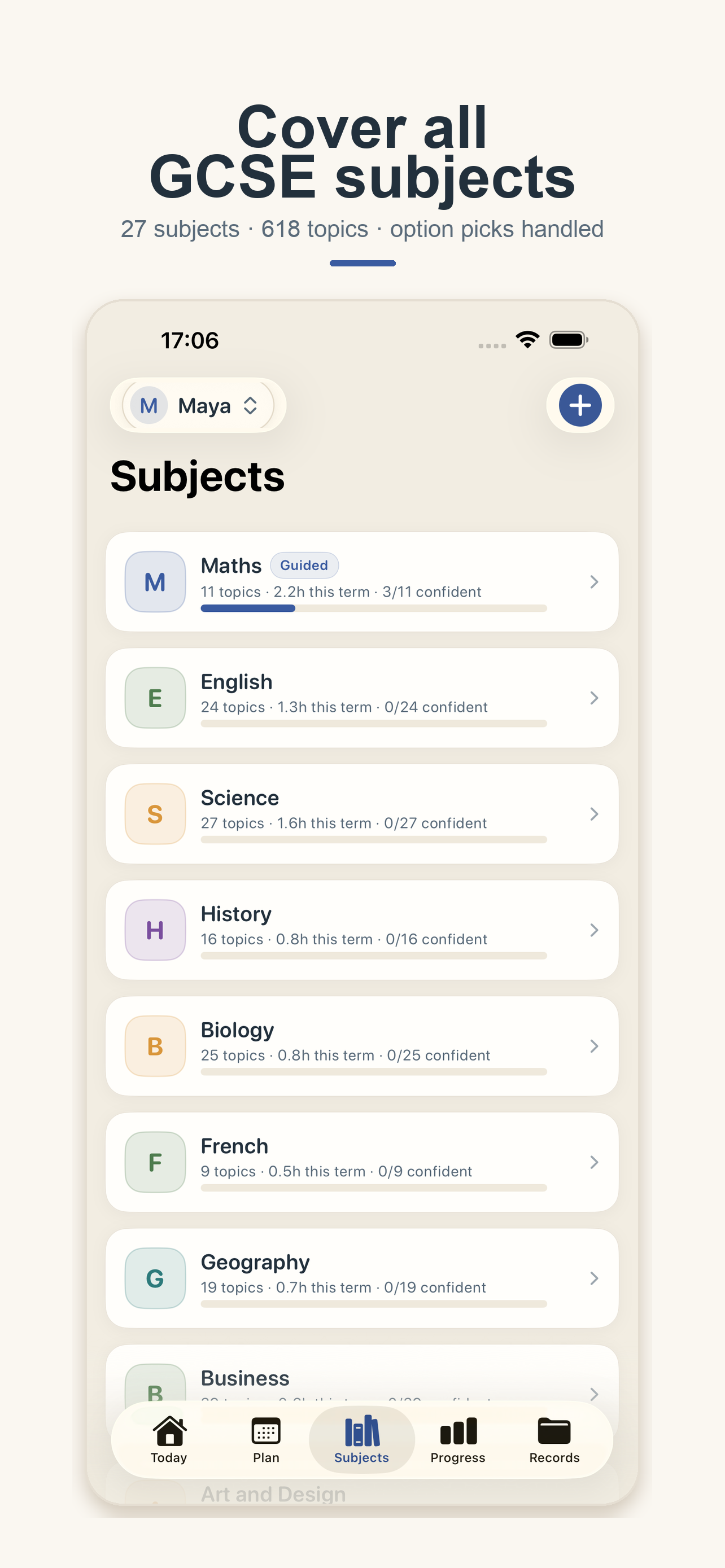
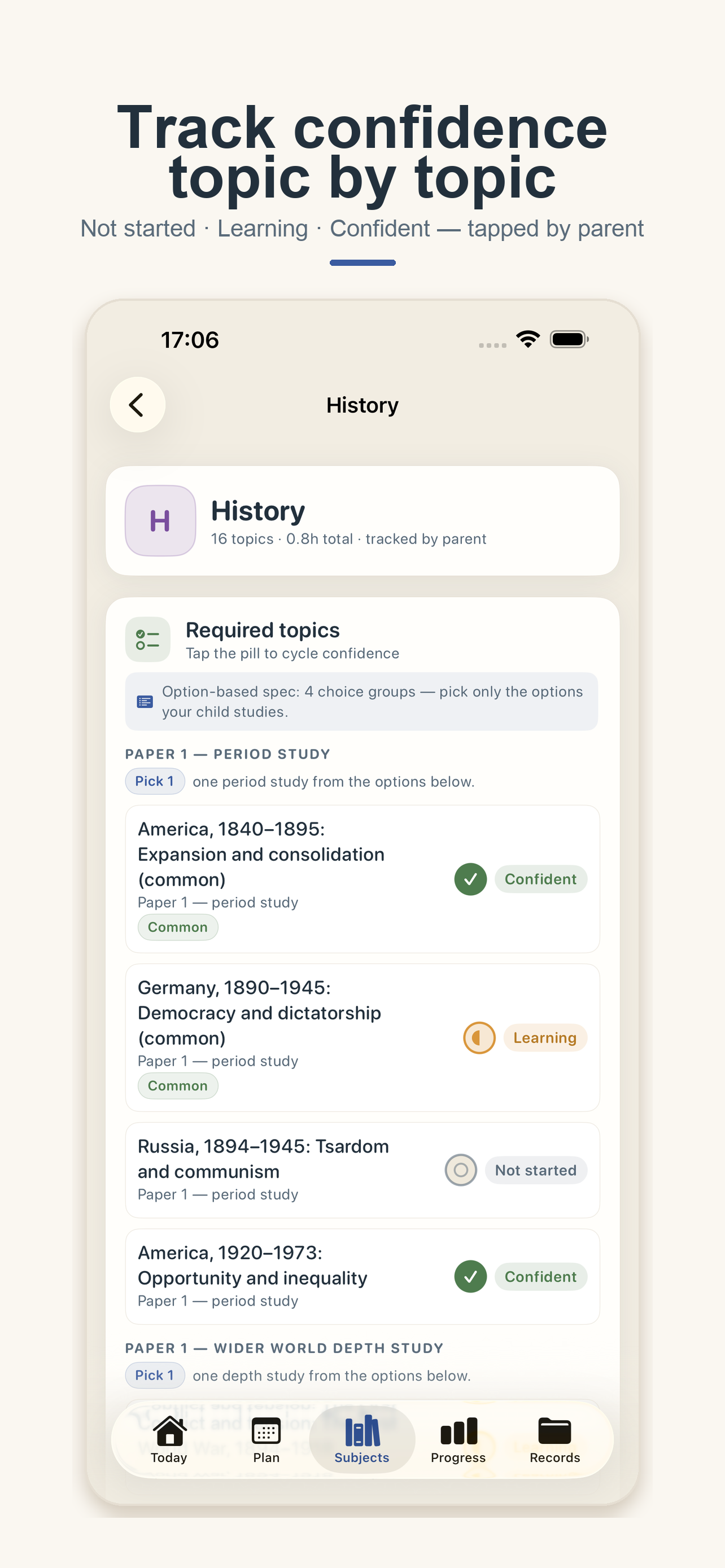
Every subject gets required-topic checklists (27 subjects, 618 topics) plus your own custom topics. Confidence is tapped by you — not started, learning, confident — and option picks are handled as picks, never a flat list.

Tracked by parent, not a grade

Proof without paperwork

The learning record and LA-ready portfolio are by-products of normal daily use. Pick a child and date range, toggle sections, preview the PDF and share through the system share sheet.

You stay in control
Maths · Guided English Science Biology History Geography French + 20 more

Guided and self-planned subjects are visibly different in the app. A self-planned subject never implies curriculum coverage it does not have.

Amber Start control • per-child • 144 pt minimum

Session timer + timetable

Start timing this session now.

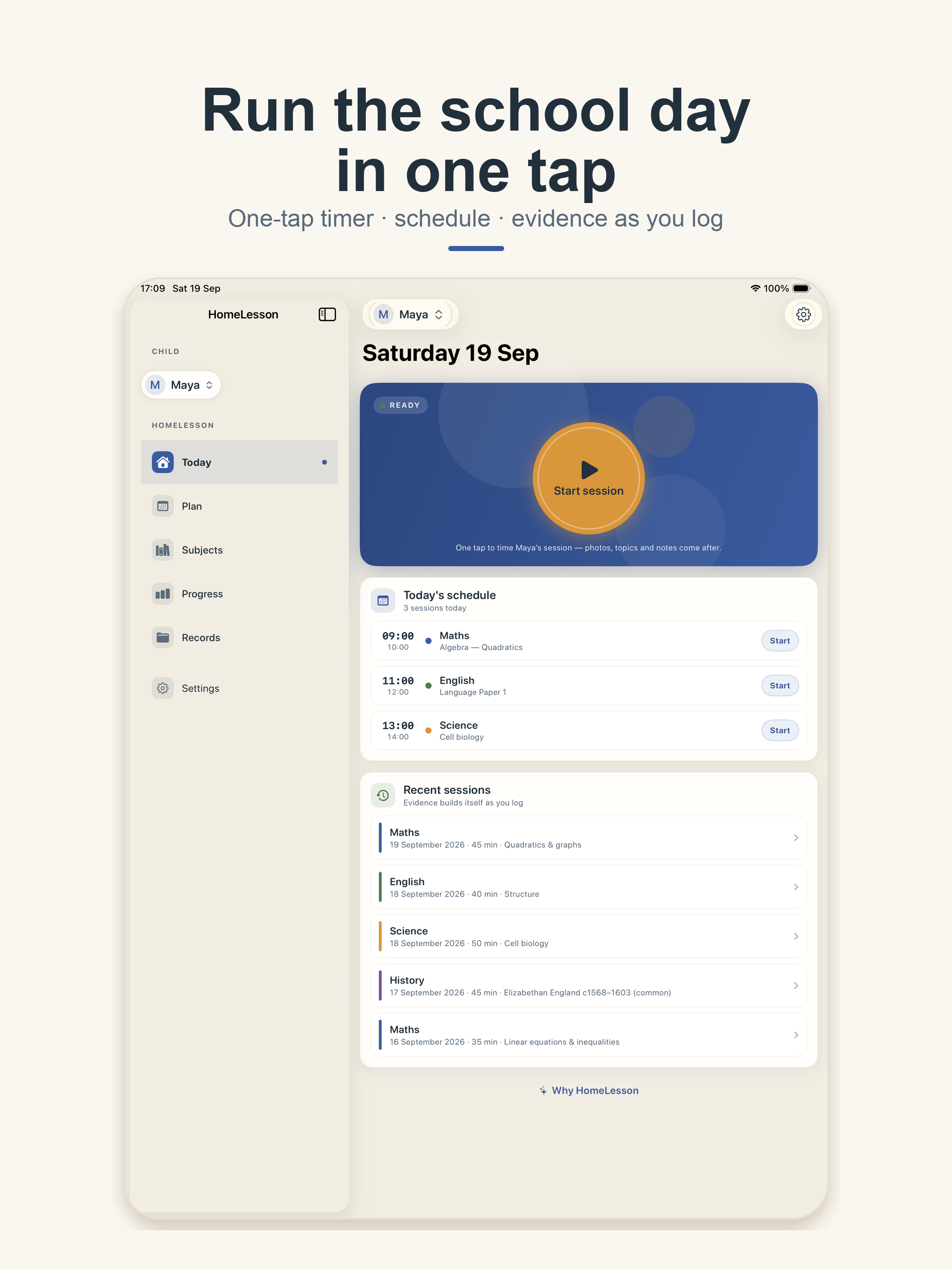
No navigation, no form, no decisions when learning starts. The timer is the source of truth — absolute start and end dates — so the duration survives anything iOS does to the app. Today also shows the week’s schedule and recent sessions, so evidence builds itself as you log.

  • Weekly timetable, per child — terms, a Monday–Sunday grid and slot editor. Subject is prefilled from the timetable when a slot matches now.
  • Local reminders, offline — up to 8 rolling reminders per slot with stable IDs, rebuilt on edit. Permission is asked only after you enable a reminder, never at first launch.
  • Evidence without effort — session notes and photos of handwritten work attach in seconds; the session appears in history, hours and attendance immediately.
HomeLesson Today screen on iPhone — Start session hero, today's schedule, recent sessions
Today • iPhone — one-tap timer, schedule, recent sessions
HomeLesson Today screen on iPad — sidebar navigation with child switcher
Today • iPad — native sidebar, shared state with iPhone

Dots never stand alone — shape + label, VoiceOver-safe

Subjects & progress

Every subject. What’s covered.

Create profiles for multiple children, define any number of subjects, and see hours, coverage and confidence per child. Attendance and hours are derived from the sessions you actually logged — half-open ranges, no double counting.

👨‍👩‍👧 Multiple children, one switcher
A prominent child control on Today, Progress and Records. Archive without deleting history.
🖼 Media stays intact
Sandbox photo storage with hashing and downsampling. A failed attachment never loses the session.
HomeLesson Subjects screen on iPhone — subject list with hours and confidence
Subjects • iPhone — 27 subjects, hours + confidence per child
HomeLesson topic detail on iPhone — required topics with confidence pills and option picks
Topics • iPhone — tap the pill to cycle confidence

Guided path #1

GCSE maths, step by step.

Ordered, exam-board-tagged topics (Edexcel, AQA, OCR) with summaries, worked examples as numbered steps, and understanding checks that are question-first: reveal the answer, then record correct, incorrect or skipped. Resumes where your child left off — and a parent who prefers their own approach can ignore the path and use Maths as a self-planned subject.

Bundled content • validated on load • never crashes on bad data
📖
Summary + steps Each topic: what it covers, then a worked example
Question first Tap to reveal, then mark correct / incorrect / skipped
Confidence updates Dots update immediately; next topic offered
🔢NumberPlace value → fractions → standard form
𝑥AlgebraExpressions → equations → quadratics
Ratio & proportionPercentages → growth → rates
📐Geometry & measuresAngles → area → Pythagoras
📊Stats & probabilityAverages → charts → probability

Boards ⊆ {Edexcel, AQA, OCR}. Content is data, not code — pluggable, so subject #2 can be added later without rework. Content upgrades never delete topics that have sessions, attempts or mastery.

Records & portfolio

Proof without paperwork.

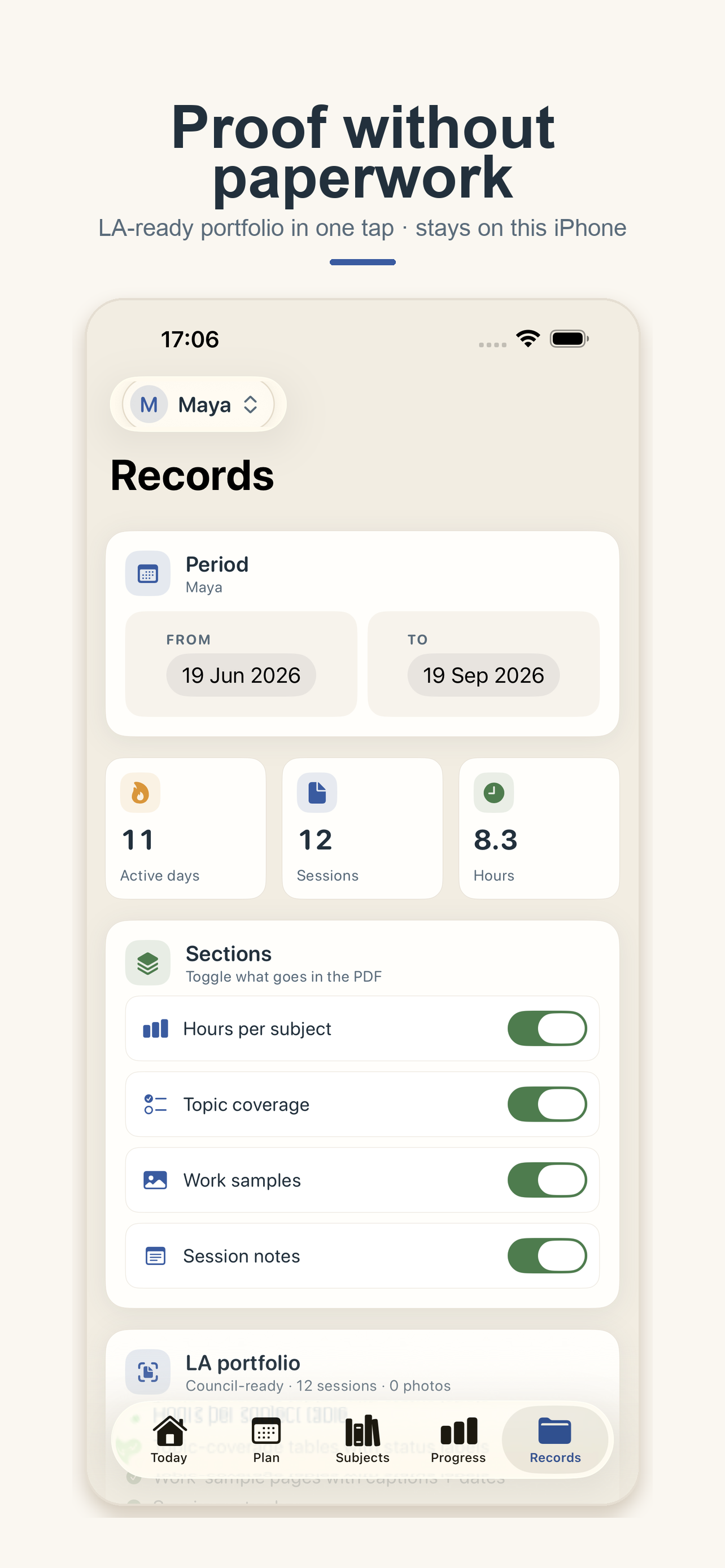
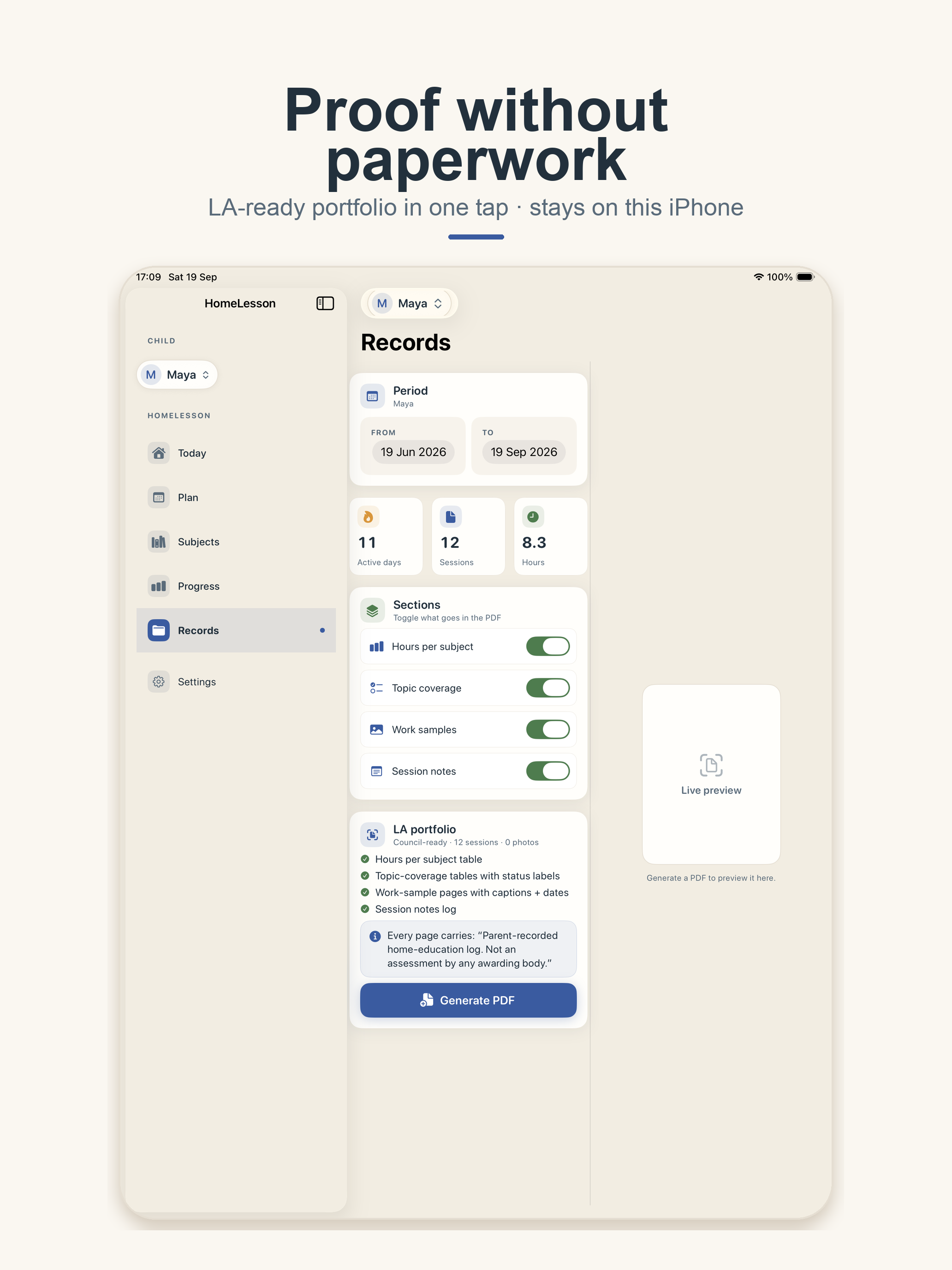
Choose a child and date range, toggle what goes in, preview the A4 portfolio side-by-side on iPad, then share through the system share sheet. Hours, coverage, work samples and session notes — generated from an immutable snapshot, so the screen, the PDF and the numbers can’t diverge.

PDF
A4
Council-ready
Active days · sessions · hours
Preview → share → clean up
11Active days
12Sessions
8.3Hours

LA portfolio — what’s inside

A4 • paginated • footer on every page
Child, date range and generation date; hours-per-subject table
Topic-coverage tables with confidence status
Work-sample pages with captions and dates
Session notes, attendance summary, JSON backup alongside

Footer on every page: “Parent-recorded home-education log. Generated from the parent’s own records. This is not an assessment by any awarding body or local authority.” No grades, predictions or assessments — ever.

HomeLesson Records screen on iPhone — period picker, stats, sections and LA portfolio builder
Records • iPhone — period, sections, LA portfolio
HomeLesson Records screen on iPad — portfolio builder with live preview
Records • iPad — live PDF preview side-by-side

Privacy

Your records stay with you.

Records stay private unless you export them. HomeLesson has no account and no cloud service and does not automatically send information to anyone. No analytics, no ads, no tracking, no network calls. Everything works in Airplane Mode.

On this device
SwiftData records + protected media storage. If you delete the app without exporting a backup, records and photos may be lost — the app tells you this and nudges you to back up.
You choose when data leaves
Only via Export or Share you tap — a PDF you send the council, a JSON backup you keep. Only share what you intend the recipient to receive.
Children’s records, parent-held
No child accounts, no ads, no profiling, no social features. A parent creates and holds the logbook on their own device. See the full policy for the App Store review details.

The in-app Settings → About & privacy screen shows the same wording as this site. See the full Privacy Policy for App Store review and details.

No account

Start with just your child’s name. No login, no profile.

No analytics

No Firebase, no ads, no remote fonts, no network layer.

Airplane-mode ready

Timer, timetable, reminders, portfolio and backup all work offline.

Your backup

JSON export + media package. Validated merge or typed-confirm replace.

How it works

Plan. Time. Prove it.

Plan it

Add a child, pick subjects, set the week.

Five promises, first child, core subjects with checklists, first term, weekly timetable. Notification permission comes later — only when you enable a reminder.

About subjects
Time it

One tap the second learning starts.

Hit Start session on Today. Stop the same way, then attach topics, a note and photos. Or walk through the guided GCSE maths path topic by topic.

About the timer
Prove it

Bring a clean record to the council.

Pick a child and date range, preview the portfolio, generate the PDF and share via the system sheet. Hours, coverage and attendance included.

About records
Tracked by parent — never a grade, prediction or assessment. No accounts, no sync, no AI tutoring, no auto-marking.

For App Store review

Support URL
https://m-pax.net/homelesson/
Privacy Policy URL
https://m-pax.net/homelesson/privacy.html
Contact
[email protected]

Demo & build

Bundle ID
net.m-pax.HomeClass
Version
1.0 (build 1) · iOS / iPadOS 17+ · iPhone + iPad
Login needed
No. Launch → onboarding → add a child → Today. Works in Airplane Mode.

For the next council enquiry, bring the record.

HomeLesson is coming soon to the App Store for iPhone and iPad (iOS 17+). Local-first, accessible with VoiceOver and large text, calm in dark mode — and honest about what it is: a planner, tracker and evidence logbook, never an assessment.

Coming soon on theApp Store Notify me →

Questions? [email protected]Privacy Policy • Parent-recorded log. This page is not an assessment by any awarding body or local authority.